


Seek by iNaturalist
3.31.53K Reviews
App Specs
- Version
- 2.18.1
- Updated On
- License
- Free
- Downloads
- 1,000,000+
- Developer
- iNaturalist
- Categories
- Education
- Platform
- Android, iOS
Screenshots
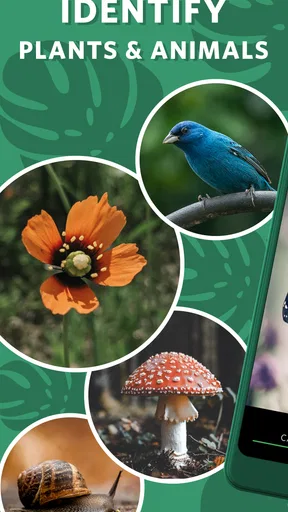
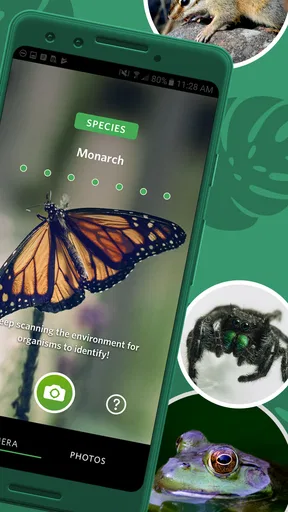
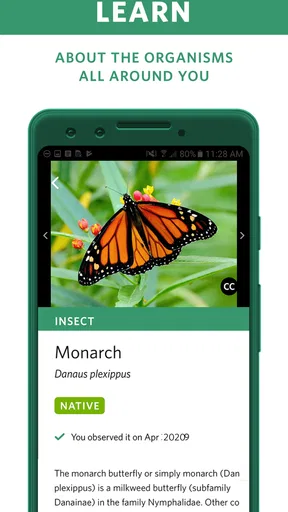
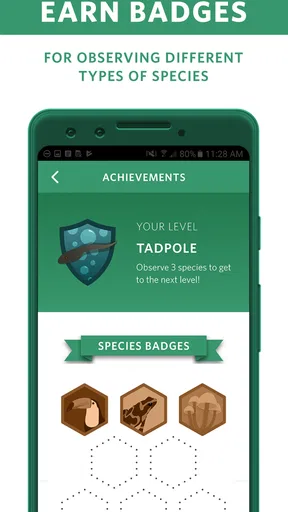
 Analysis by AppCompare
For a first outing, I’d treat Seek as a curious companion rather than an authority I have to obey. It is an education app from iNaturalist, and its appeal is simple: when something catches my eye outdoors, I can use my phone to investigate it instead of walking past with only a vague guess. The app is free, rated for Everyone, and has a 3.3 average from around 10,000 ratings, so I would go in with realistic expectations: useful and inviting, but not perfect in every situation.
What to expect from a nature-identification app
Seek is best understood as a starting point for observation. Its image recognition can suggest what a plant or animal might be, then give you a reason to look more closely. That is a different promise from carrying a field guide: a book lets you compare descriptions at your own pace, while Seek makes the camera the quickest route from “What is that?” to a plausible name. For a beginner, that shortcut can make an ordinary walk feel more engaging.
I would not treat every result as a firm identification, especially when the subject is small, partly hidden, or hard to distinguish from similar species. A suggested name is a lead, not proof. Check the visible details against what is in front of you, and be comfortable stopping at a broader identification when the exact species is unclear. That habit makes the app more useful, not less: learning how to notice differences is part of the outing.
Getting ready for the first outing
After installing it, keep the first session simple. Open the camera when you are somewhere with a clear view of a living subject, and try a plant or animal that is easy to see. A single flower, leaf, or slow-moving insect is a less frustrating first target than a distant bird or a tiny creature in deep shade. You do not need to turn a walk into a formal survey to get value from the app.
Before pointing the phone, pause long enough to frame the subject clearly. Avoid photographing a crowded patch where several leaves, flowers, and bits of background compete for attention. If the first attempt gives an uncertain result, move closer only if you can do so without disturbing the organism, steady the phone, and try again in better light. This small change in approach is often more helpful than repeatedly aiming at the same blurry view.
A first identification that teaches you something
A satisfying first success is not simply seeing a name appear. I would use the result as a prompt: notice the shape, color, or other visible feature that might support the identification, then compare it with the subject itself. If the suggested species does not seem to fit, treat that mismatch as useful information and try another clear angle rather than forcing the answer. The goal is to become more observant, not to collect a label at any cost.
For a realistic first use, imagine pausing beside a flowering plant on the route to a shop. Take a moment to get a clear view, check the suggestion, and read enough to understand what you may be looking at. You can then put the phone away and continue your day with a new detail to notice next time. That brief routine is more practical than stopping for a long session whenever something catches your eye.
Worth Reading Before You Choose

EA SPORTS FC Mobile 26 Is a Bigger Football Game, but It Takes Time

Flipboard Shows What News Apps Must Do Beyond the Feed

Switching to Android Auto Means Rethinking Your Driving Routine

Google Calendar Makes a Crowded Week Easier to Manage

Ludo King Makes the Most of the Minutes Between Plans

Baby Panda World Brings Quick Play to Modern Phones, but Its Game Library Feels Busy
Common sources of confusion
One common misunderstanding is expecting a camera result to settle every identification question. Lighting, distance, angle, and how distinctive the subject is can all affect what the app recognizes. A familiar garden flower in clear daylight is a fairer test than a partly obscured plant or a fast-moving animal. When the result seems off, I would not assume that the app has failed completely; I would first ask whether the image gave it enough to work with.
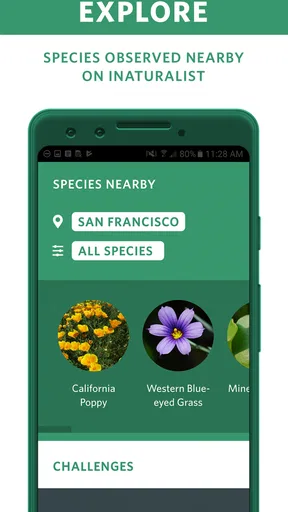
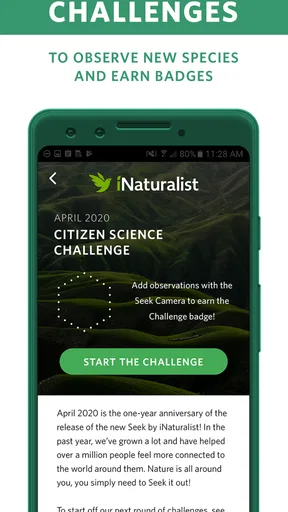
Another point worth keeping in mind is that nearby species on a map are not the same thing as a guarantee that you will encounter them on your particular walk. Use that feature as inspiration for looking around, not as a promise about what will be present. Likewise, a badge can make exploration more playful, but it should not turn wildlife into a checklist. I would rather leave an animal undisturbed than get a closer image or another achievement.
Who will get the most out of it
Seek makes the most sense for families, casual walkers, and people who enjoy learning a little at a time. A parent can use a short stop to turn a child’s question about a bug into a shared observation; a beginner can explore plants without needing to know technical terms before starting. The badge system may also give children a light incentive to keep noticing things, though I would keep the focus on curiosity rather than on completing every possible activity.
It is less suitable if you need a dependable, expert-level identification for a consequential decision, or if your main interest is studying a difficult species in detail. In those cases, a specialist field guide or a knowledgeable local source may be a better next step. Seek can help you find a direction, but a quick camera suggestion should not replace careful verification where accuracy matters.
How it fits beside other ways to identify nature
Compared with searching the web manually, Seek removes much of the work of guessing the right search words. That is a real advantage when you do not know whether you are looking at a flower, a leaf, or an insect with an unfamiliar shape. A field guide, on the other hand, can be better when you want to compare several traits deliberately, and it does not depend on getting a useful camera image. I see the app and a guide as different tools rather than direct substitutes.
The broader iNaturalist connection adds a learning and citizen-science dimension: observations can contribute to a wider picture of biodiversity. That makes the experience feel more meaningful than simply looking up a name, but it is still worth being thoughtful about what you record and how certain you are. For casual exploration, a tentative identification can be a useful prompt; for careful contribution, take time to inspect the organism and its context before treating a guess as settled.
The app has been available since January 18, 2019, and its current version is 2.18.0. It has over one million installs, which suggests that many people have tried this approachable way to explore nearby nature. Those figures do not make every identification reliable, but they do help explain why Seek is an established option for casual discovery rather than an obscure experiment.
Seek is also not the right choice for every outing. If you are walking somewhere without a clear view of wildlife, or simply want to enjoy the scenery without using your phone, there is no need to open it. I would also choose another method when a precise answer is essential or when the subject is too far away to photograph well. Its best role is to add a little context when curiosity naturally arises, not to take over the walk.
Ever wandered through a park and wondered what that mysterious plant was? Or maybe you’ve spotted a quirky insect and wished you had a pocket expert to tell you all about it? Well, let me introduce you to Seek by iNaturalist. This app is a game-changer for anyone curious about the natural world around them.
Discover Nature with Ease
Imagine stepping outside and simply pointing your phone at a flower, bird, or bug, and instantly getting information about it. That's exactly what Seek by iNaturalist offers. Armed with a powerful image recognition technology, this app allows you to identify plants and animals on the fly. It's like having a naturalist in your pocket, ready to share insights at a moment's notice.
First Impressions
As soon as I launched the app, I was greeted by an intuitive interface that made navigation a breeze. The home screen features a simple design with easy access to the camera for quick identifications. I love how user-friendly it is, making it accessible to everyone from kids to seasoned nature enthusiasts.
How It Works
The process is straightforward: open the app, point your camera at whatever you’re curious about, and watch as the app works its magic. In mere seconds, Seek by iNaturalist provides detailed information about the species, including its name, taxonomy, and interesting facts. It’s like having a mini encyclopedia in your hands, without the weight!
Features That Stand Out
One of my favorite features is the ability to earn badges. It's like a gamified learning experience where you can track your progress and achievements. Whether you’re identifying your first plant or getting to know local wildlife, the badges add an element of fun and encouragement. Plus, there’s a built-in map feature that helps you explore nearby species, encouraging you to step outside and embark on a mini adventure.
- Real-time identification
- Badge earning system
- Comprehensive species database
- User-friendly interface
Learning and Sharing
Another aspect I appreciate is the learning opportunity it provides. With every identification, you’re not just learning a species name; you’re diving into a world of fascinating facts and ecology. The app also integrates with the iNaturalist community, allowing for data sharing and contributing to a broader citizen science initiative. It’s rewarding to know that your discoveries can help scientists understand biodiversity better.
Room for Improvement
While Seek by iNaturalist is fantastic, there’s always room for growth. Occasionally, the app struggles with identifying less common species or when the lighting is poor. However, these instances are few and far between, and the app constantly updates to improve its accuracy.
Final Thoughts
In a world where technology often distracts us from nature, Seek by iNaturalist is a breath of fresh air. It encourages exploration, learning, and a deeper appreciation for the environment. Whether you’re a nature lover or someone just looking to learn more about the world, this app is a must-have. It’s an engaging way to connect with the outdoors and bring a little bit of wonder back into our daily lives.
So, the next time you're out for a walk, let Seek by iNaturalist be your guide. Who knows what amazing discoveries are waiting just around the corner?
Pros
- User-friendly interface for easy navigation.
- Accurate identification using AI technology.
- Supports offline exploration of nature.
- Encourages learning about biodiversity.
- Community engagement with other nature enthusiasts.
Cons
- Limited database in remote regions.
- Requires internet for full functionality.
- Occasional misidentification of species.
- Battery drain during prolonged use.
- No social media sharing options.
FAQs for Seek by iNaturalist
What is Seek by iNaturalist and how does it work?
Seek by iNaturalist is an educational app designed to help users identify plants and animals using image recognition technology. Simply point your device's camera at a plant or animal, and the app will provide information about the species. It’s particularly useful for nature enthusiasts, students, and educators who want to learn more about biodiversity.
Is Seek by iNaturalist suitable for children?
Yes, Seek by iNaturalist is designed to be family-friendly and is suitable for children. The app encourages exploration and learning about nature, making it an excellent tool for educational purposes. It does not require an account, making it accessible and easy for kids to use safely under parental supervision.
Do I need an internet connection to use Seek by iNaturalist?
Seek by iNaturalist requires an internet connection to access its vast database for identifying species. While you can take photos offline, you will need to connect to the internet to get detailed information and identification results. It's recommended to use the app in areas with good connectivity for the best experience.
Can Seek by iNaturalist be used worldwide?
Yes, Seek by iNaturalist can be used globally. The app is designed to recognize a wide variety of species from around the world, making it a versatile tool for nature enthusiasts everywhere. However, the accuracy of identification may vary depending on the region and the availability of species data.
Does Seek by iNaturalist store my location data?
Seek by iNaturalist can access your location to provide you with more accurate species identification based on your geographical area. However, it does not store location data without your permission. Users can choose to enable or disable location access within their device settings to control privacy preferences.


